
Zobirez 420W 10-Port Fast USB Charging Station
4.5Editor score
10 ports including 5 USB-C
Up to 420W total output
Includes 8 mixed charging cables
This guide compares the top charging stations for multiple devices to help you organize cables and power phones tablets and laptops efficiently.
Finding a reliable charging station for multiple devices is essential in today's connected world. With so many gadgets competing for outlet space, a good organizer keeps your desk tidy and ensures everything powers up when you need it most.
We evaluated ten leading models based on port count, charging speed, safety features, and build quality. Our comparison covers options ranging from compact travel units to powerful desktop hubs designed for families or offices.
Each pick highlights key strengths and real-world use cases to help you decide quickly. Note that product availability and pricing change frequently, so verify details on the retailer page before purchasing your next charging hub.
4.5Editor score

4.6Editor score

4.7Editor score
The following table offers a side-by-side view of each model we reviewed. Use these specs to compare port types, total wattage, and special features at a glance before diving into the detailed breakdowns.




The Zobirez 420W 10-Port Charging Station delivers impressive versatility for users with many devices. It earned a solid rating from thousands of verified buyers who appreciate its ability to handle laptops, tablets, and phones simultaneously.
We may earn a commission when you buy through this link, at no additional cost to you.
Its standout quality is the combination of five USB-C and five USB-A ports, offering flexibility for both modern and legacy hardware. The included cables reduce setup hassle, making it a true all-in-one solution for home offices or family hubs.
One trade-off is the physical size, which requires dedicated desk space. Additionally, lacking AC outlets means it cannot replace a power strip entirely. These compromises are acceptable given the high power and organization it provides.
If you need a single hub for a mixed ecosystem of Apple and Android devices plus laptops, this model is a top recommendation. Its safety features and durable build make it a reliable long-term investment.
Two 65W GaN ports allow you to charge MacBooks and other high-wattage laptops quickly without separate bricks.
The box includes eight short mixed cables covering iPhone, USB-C, and Micro-USB standards to get started immediately.
We may earn a commission when you buy through this link, at no additional cost to you.
The Zobirez 750W model takes power to the next level with twelve USB-C ports capable of delivering 120W each. This is ideal for users with multiple high-end laptops or power-hungry tablets that need serious charge speed.
We may earn a commission when you buy through this link, at no additional cost to you.
Key strengths include its ability to charge MacBooks and iPad Pros simultaneously without throttling. The case-friendly center bays accommodate tablets with bulky covers, ensuring stability during long charging sessions.
The main downside is the higher price point and physical footprint compared to simpler hubs. However, if you need max wattage across many devices, the value is clear. It is a powerhouse for demanding environments.
Choose this if you run a small business or family with heavy tech usage. Its advanced safety systems and robust construction justify the investment for those who cannot afford charging downtime.
Each USB-C port can deliver up to 120W, enabling full-speed charging for most modern laptops.
Flame-retardant ABS construction ensures longevity and prevents wobble, even with heavy devices inserted.
We may earn a commission when you buy through this link, at no additional cost to you.
The Anker Prime Charging Station offers a balance of power and size that fits neatly on a work desk. With 200W total output, it handles six devices at once while maintaining high speed for laptops and phones.
We may earn a commission when you buy through this link, at no additional cost to you.
Its key strength lies in Anker's proprietary safety system, which continuously monitors temperature to protect your gear. The compact design ensures it does not dominate your workspace, unlike larger multi-port competitors.
It has fewer ports than top options, meaning you must prioritize which devices get charged simultaneously. Still, for a personal workstation, six ports are usually sufficient. The efficiency of GaN tech reduces heat significantly.
This model is ideal for professionals who value brand trust and compactness. If you need a reliable daily driver for laptops and phones without bulky clutter, Anker Prime is a smart pick.
Gallium Nitride components allow for a smaller design without sacrificing power output or safety.
Weighing about 1.24 pounds, it stays put on your desk even when handling multiple connected devices.
We may earn a commission when you buy through this link, at no additional cost to you.
The USB Fast Charger Block is a budget-friendly option designed primarily for mobile devices like phones and tablets. Its compact size makes it easy to slip into a bag, ideal for travel or dorm rooms.
We may earn a commission when you buy through this link, at no additional cost to you.
Key strengths include the detachable AC extension cord, giving flexibility in placement. The six ports handle a mix of phones and small accessories well, keeping your nightstand organized.
The trade-off is that it is not intended for laptops due to lower wattage limits. If you need to charge computers, this will not suffice. For pure mobile needs, it is an excellent value.
Buy this if you want a simple, small hub for phones and earbuds. It is perfect for students or travelers who need a bit of charging without taking up much space.
At just 3.27 inches wide, it fits easily into bags, pockets, or tight desk nooks.
A 5ft detachable AC extension cord lets you place the unit away from the wall outlet.
We may earn a commission when you buy through this link, at no additional cost to you.
The Anker MagGo 3-in-1 Charging Station is tailored for Apple users seeking a wireless setup. It delivers full 15W charging to iPhones and includes a dedicated spot for the Apple Watch.
We may earn a commission when you buy through this link, at no additional cost to you.
Its key strength is the Qi2 certification, which ensures consistent and efficient power transfer for supported devices. You can adjust the stand vertically to find a comfortable viewing angle for media or alarms.
The downside is that it focuses on the Apple ecosystem, limiting versatility for Android users. The price is also higher than wired hubs. However, the convenience of a single dock for three devices is unmatched.
This is the right choice for an iPhone and Apple Watch owner wanting a tidy nightstand. It reduces cable clutter significantly while providing fast wireless charging where needed.
Certified fast charging allows your Apple Watch to go from zero to full in just over an hour.
Adjust the stand up to 45 degrees for optimal landscape orientation and StandBy mode usage.
We may earn a commission when you buy through this link, at no additional cost to you.
The Anker Desktop Charger blends a power strip with USB ports, offering the best of both worlds. It features three AC outlets and six USB ports, allowing you to plug in large appliances alongside phones.
We may earn a commission when you buy through this link, at no additional cost to you.
Its standout feature is the built-in surge protection, which safeguards sensitive electronics from power spikes. The eight-point safety system provides peace of mind for expensive gear on your desk.
The unit is heavier and larger than pure USB hubs, which might limit placement options. If you need a replacement for your wall power strip, this is the one to choose.
Ideal for users needing AC outlets alongside USB, this model is a versatile desk companion. It handles mixed device types effortlessly and is robust enough for daily heavy use.
Three AC outlets allow you to plug in lamps, monitors, or other bulky chargers.
Eight safety features protect against overvoltage, short circuits, and other electrical risks.
We may earn a commission when you buy through this link, at no additional cost to you.
The MSTJRY 5 Port USB-A Charging Station is a straightforward solution for users with older devices. It offers five standard USB-A ports and includes seven short cables to get started immediately.
We may earn a commission when you buy through this link, at no additional cost to you.
Its main strength is simplicity and value. The included cables and dividers make it easy to organize phones and tablets on a nightstand or kitchen counter without extra purchases.
However, relying on USB-A means slower charging compared to modern USB-C options. If you have newer phones requiring fast charging, this may not meet your speed needs.
This model is a great gift for parents or grandparents who need basic charging. It keeps things simple and organized without overwhelming features or high costs.
Dividers can be removed to hold larger tablets or phones with thick cases securely.
Seven cables for iOS, Micro-USB, and USB-C are included in the box for immediate use.
We may earn a commission when you buy through this link, at no additional cost to you.
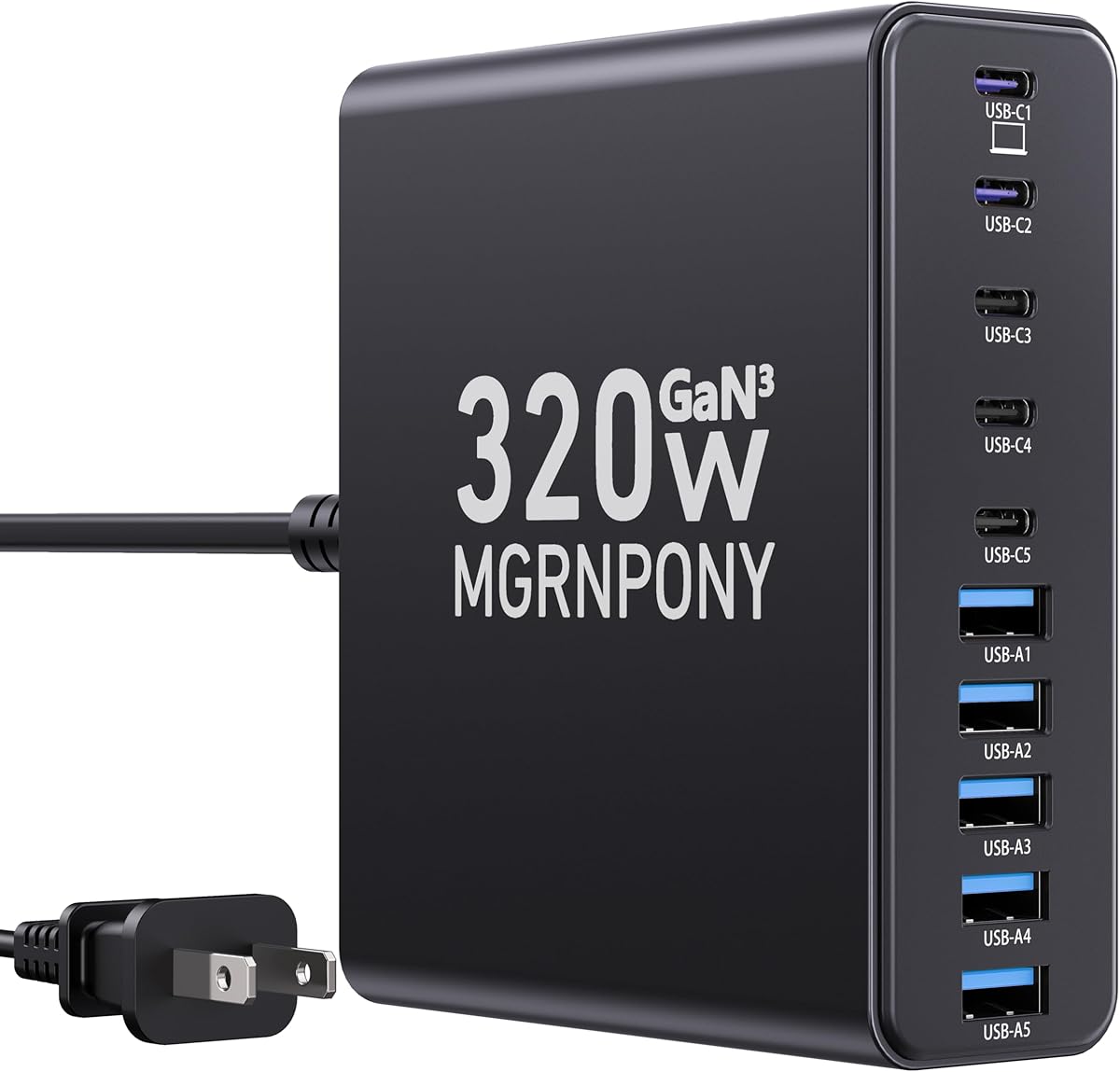
The MGRNPONY 320W 10-Port Charging Station offers a strong balance of ports and power for the price. With ten ports, it can charge laptops, phones, and accessories simultaneously without slowing down.
We may earn a commission when you buy through this link, at no additional cost to you.
Its standout quality is the GaN III technology, which provides enhanced safety and efficiency. The design helps prevent overheating during long sessions, ensuring longevity for both the unit and your devices.
One minor issue is that it does not come with a full set of high-quality cables like some rivals. You may need to use your own for optimal performance. Otherwise, it is a solid performer.
Buy this if you want ten ports without paying top dollar. It is a great option for families or shared workspaces where everyone needs a quick charge.
IceShield 3.0 technology monitors temperature millions of times daily to ensure safety.
Compact enough for a suitcase, it replaces multiple bulky chargers when you are on the go.
We may earn a commission when you buy through this link, at no additional cost to you.
The 8-in-1 Retractable Charging Station solves cable clutter by hiding cords inside the unit. With four retractable cables, you can charge phones and tablets without the mess of loose wires.
We may earn a commission when you buy through this link, at no additional cost to you.
Its main strength is the space-saving design that keeps your desk tidy. The cables extend up to 80cm, giving enough room to reach devices while keeping the setup neat.
The downside is that the cables are fixed inside and may wear over time. If a cable breaks, you cannot easily swap it like with separate cords. Still, the convenience is hard to beat.
This is perfect for nightstands or desks where clean lines matter. If you hate tangled cables and want a unified dock, this model is a clever solution.
Four retractable cords keep your space tidy by storing cables when not in use.
GaN technology ensures your devices charge quickly even when multiple cables are used.
We may earn a commission when you buy through this link, at no additional cost to you.
The Lcssio 300W Charging Station is built to handle a busy household with multiple tablets and phones. It offers eight ports and sturdy slots designed to keep devices secure while charging.
We may earn a commission when you buy through this link, at no additional cost to you.
Its key strength is the solid construction that prevents tipping. The anti-slip pads keep it steady on counters, making it safe for use around children and pets.
The dividers are fixed, meaning you cannot remove them to fit larger devices. This limits flexibility slightly but adds to the unit's stability. It is a practical choice for daily family use.
Choose this if you need a reliable hub for a shared space. It offers enough power for laptops and phones while keeping the area neat and organized.
Extra wide and high slots accommodate tablets with cases securely without wobbling.
Four rubber pads protect your desk and keep the station from sliding during use.
We may earn a commission when you buy through this link, at no additional cost to you.
Selecting the right charging station involves weighing several key factors. Use this guide to identify what matters most for your setup.
Total wattage determines how many devices you can charge simultaneously without slowing down. For laptops, look for USB-C ports offering at least 60W to 100W each. Phones and tablets usually require 20W to 30W.
Choose a unit with enough total wattage to cover your highest-power devices when used together.
Decide between USB-A and USB-C ports based on your devices. Modern phones and laptops use USB-C for faster speeds, while older gadgets rely on USB-A. A mix ensures compatibility for everything.
Prioritize USB-C if you have newer tech to future-proof your setup.
Slots or dividers keep devices upright and separated to prevent overheating. Removable dividers offer flexibility for large tablets or cases, while fixed ones are more durable.
Ensure the unit fits your desk space and has enough height for your devices.
Look for certifications and features like over-voltage, over-current, and short-circuit protection. GaN technology often improves safety and efficiency compared to traditional silicon.
Always verify that the unit has standard safety certifications from recognized bodies.
Many stations come with a bundle of cables to get you started immediately. This saves cost and reduces clutter, but check that the cables match your device standards.
A complete kit is a significant value add for quick setup.
Some stations include AC outlets to function as a power strip hybrid. This is useful for plugs like monitors or lamps, whereas USB-only units focus on digital gear.
Choose AC plus USB if you need to replace your power strip.
If you plan to take the station on trips, prioritize compact designs and lightweight materials. Detachable power cords and small footprints make packing easier and more convenient.
A travel-ready model saves space and reduces bulk in your bag.
Trusted brands often provide better quality control and customer support. A warranty indicates confidence in the product's longevity and can save money on replacements.
Always check warranty terms and support availability before buying.
Place the charging station on a stable, flat surface away from heat sources or direct sunlight. Ensure there is enough airflow around the vents to prevent overheating during extended use.
Plug your devices into the appropriate ports using the included or compatible cables. Avoid bending or twisting cables sharply, as this can damage internal wires and affect charging performance.
Periodically unplug all devices and wipe the unit with a dry cloth to remove dust. Keep the charging ports free from debris to maintain good electrical contact and prolong the lifespan of the hub.
Yes, many modern charging stations support simultaneous charging of laptops and phones. Look for models with high total wattage and USB-C ports capable of delivering at least 60W to ensure your laptop charges properly while other devices use remaining power.
Not necessarily. Many charging stations come with a bundle of mixed cables. However, if your devices use unique connectors or require fast charging standards, you may need to purchase additional high-quality cables separately.
GaN stands for Gallium Nitride, a semiconductor material that allows chargers to be smaller and more efficient. It generates less heat and often includes better safety protections, making it ideal for multi-device hubs.
Check for built-in safety features like over-voltage and short-circuit protection. Reputable brands usually include these systems. Look for certifications like UL or CE to ensure the unit meets safety standards.
Yes, most modern charging stations have smart chips that stop charging when devices reach full capacity. However, avoid using the station near flammable materials or in hot environments to ensure safety.
No, USB-C ports require USB-C cables to work properly. If you have USB-A devices, ensure your charging station includes specific USB-A ports or purchase compatible USB-C to USB-A adapters separately.
We reviewed ten top models ranging from budget-friendly USB-A hubs to powerful GaN stations. The Anker Prime and Zobirez options stand out for their speed and reliability across mixed ecosystems.
Prioritize total wattage and port types based on your most demanding devices. A unit with enough USB-C power for laptops will serve you better long-term than a simple phone-only charger.
Prices and availability fluctuate often, so check current listings before purchasing. With the right charging station, you can reclaim your desk space and keep all your gear powered efficiently.