
TRENDnet Ethernet Over Coax MoCA 2.5 Adapter
4.3Editor score
1Gbps Gigabit LAN port
Compact and lightweight design
Backwards compatible with MoCA 1
This guide compares the top ten coax to Ethernet adapters for home networking, evaluating speed, compatibility, and reliability for your setup.
Finding a reliable coax to Ethernet adapter can transform your home network without running new cables. These devices use existing coaxial wiring to deliver fast, stable internet connections to every room in your house efficiently.
We compared ten leading models based on speed, compatibility, and ease of setup. Our analysis covers MoCA 2.5 adapters, G.hn solutions, and PoE options to help you find the perfect match for your ISP and wiring.
Each pick highlights key features, pros, and cons to guide your decision. Note that product availability and pricing change frequently, so check current listings before purchasing to ensure you get the best deal available today.
4.3Editor score

4.4Editor score

4.6Editor score
This table provides a side-by-side comparison of the ten best coax to Ethernet adapters available today, highlighting their key specifications to help you choose the right one for your network needs.


The ScreenBeam ECB7250K02 stands out as the top choice for home networking. With a rating of 4.4 stars, it delivers blazing-fast speeds using your existing coax wiring. It is perfect for anyone who wants to upgrade their network without the mess of running new Ethernet cables through walls.
We may earn a commission when you buy through this link, at no additional cost to you.
This adapter uses bonded MoCA 2.5 technology to push speeds up to 2.5 Gbps, which is significantly faster than traditional Wi-Fi. The low latency ensures smooth streaming and gaming without buffering. It supports up to 16 nodes on one network, making it ideal for large homes with multiple devices.
While it is an excellent device, it is not compatible with satellite TV systems like DirecTV or Dish. Also, some users might find the price point higher than basic adapters. However, the performance gains and ease of use make it a worthwhile investment for serious users.
If you need reliable high-speed internet for 4K streaming or gaming, this is the adapter to buy. It works with most routers and ISPs, provided your home has the right coax setup. Check your ISP compatibility before purchasing to ensure smooth operation.
The 2.5 Gbps Ethernet port allows for maximum bandwidth usage, supporting multiple high-demand applications simultaneously without slowdowns.
All necessary cables are included in the box, so you can get started immediately without needing extra purchases or technical skills.
We may earn a commission when you buy through this link, at no additional cost to you.
The TRENDnet TMO-312C is a fantastic option for those on a budget. It has a solid 4.3 rating and offers reliable performance for everyday internet needs. This adapter converts your coax signal to Ethernet efficiently, providing a stable connection that Wi-Fi often struggles to match.
We may earn a commission when you buy through this link, at no additional cost to you.
It features a 1Gbps Gigabit LAN port, which is sufficient for most standard internet plans. The compact design means it won't clutter your desk or entertainment center. TRENDnet is known for quality, and this model comes with strong manufacturer support and compliance with government standards.
One trade-off is that it does not include extra cables, so you may need to buy your own coax and Ethernet cables separately. It also has a single port, so you can only connect one device per adapter. Despite this, it remains a great value for its price.
If you want a no-fuss solution to extend your network to a single room, this adapter is perfect. Just ensure your coax wiring is compatible and check that your ISP supports MoCA 2.5. It is a smart choice for casual users or secondary connections.
You get reliable MoCA 2.5 performance without paying a premium, making it accessible for budget-conscious households.
The adapter meets NDAA and TAA standards, which can be important for certain professional or government-related network setups.
We may earn a commission when you buy through this link, at no additional cost to you.
The Kiwee Broadband adapter is a premium choice for power users who want maximum speed. With a 4.6 rating, it offers dual 2.5GbE ports, which is unique in the market. This allows you to connect multiple devices at full speed, making it ideal for complex home offices or media centers.
We may earn a commission when you buy through this link, at no additional cost to you.
It leverages the latest MoCA 2.5 technology to deliver lightning-fast wired LAN speeds. The reliability is top-notch, ensuring smooth gameplay and video calls even during peak hours. The kit includes all necessary cables, so you can set up your network instantly without extra purchases.
The main downside is the higher price, and it works best with a router that supports 2.5GbE. If your router is limited to 1Gbps, you might not see the full benefit. However, the future-proof design means it will last longer as your internet speeds increase over time.
For those building a high-performance home network, this adapter is worth the investment. It eliminates bottlenecks and provides a rock-solid connection for all your devices. Just make sure your router is ready to handle the speed for optimal results.
Having two ports allows you to connect a console and a TV simultaneously without needing a separate switch or extra cables.
The inclusion of coax and Ethernet cables saves time and money, ensuring you have everything needed for a quick installation.
We may earn a commission when you buy through this link, at no additional cost to you.
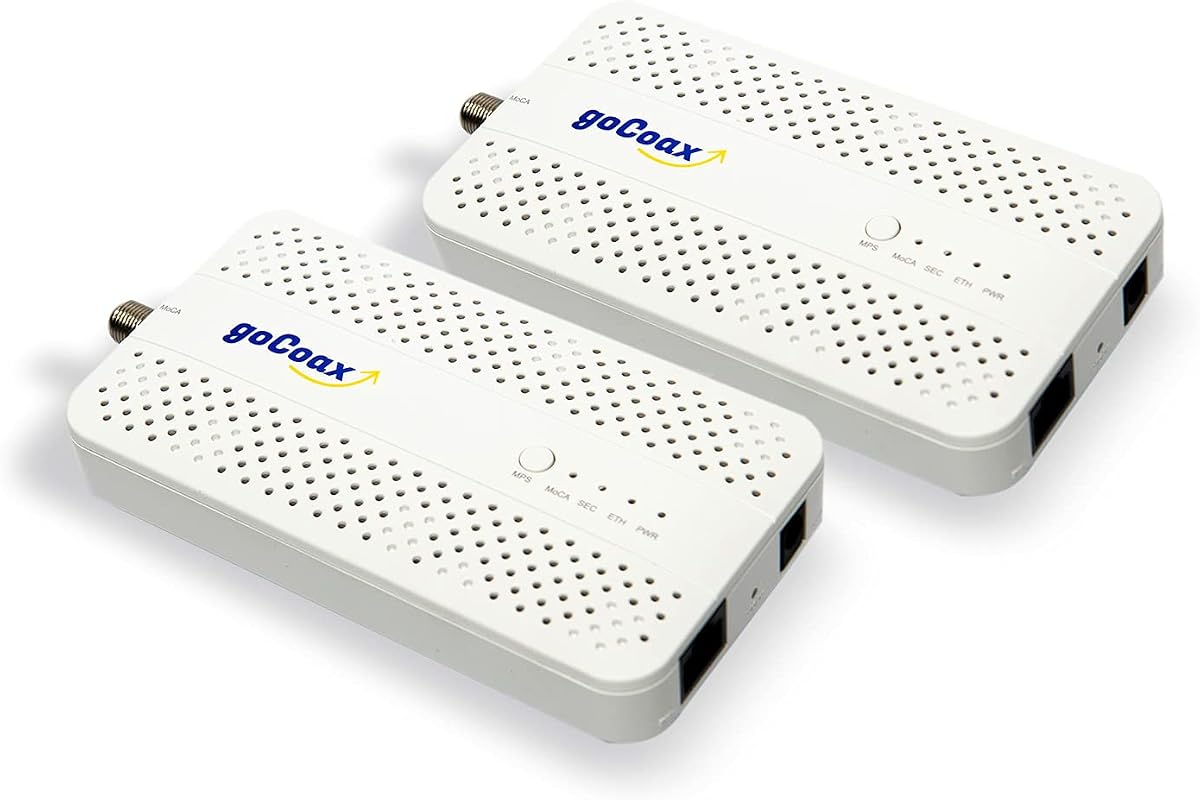
goCoax is a trusted brand in the MoCA world, and their adapter reflects that expertise. With a 4.6 rating, it delivers full 2.5 Gbps bandwidth through existing coax. It is designed for lag-free gaming and streaming, making it a solid choice for media rooms and home offices.
We may earn a commission when you buy through this link, at no additional cost to you.
The adapter features under 3ms latency, which is significantly better than Wi-Fi. This ensures that your video calls and online games run smoothly without lag. It works with major ISPs like Comcast and Spectrum, and supports up to 16 nodes for whole-home coverage.
To use it properly, you need existing coax wiring connected through a splitter. Also, it is not compatible with satellite systems. While these are standard limitations for MoCA devices, they are important to remember before buying. The kit includes everything you need to get started.
If you want a reliable network extension without new wiring, this adapter is a great option. It is easy to set up and works alongside your existing modem. Check your home wiring first to ensure compatibility, and enjoy fast wired speeds anywhere in your house.
The low latency makes this adapter ideal for competitive gaming where even a few milliseconds of delay can make a difference.
Everything from power adapters to cables is included, so you can start using the adapter immediately without additional trips to the store.
We may earn a commission when you buy through this link, at no additional cost to you.
The TRENDnet TMO-313C2K is highly rated at 4.8 stars, showing great customer satisfaction. It uses MoCA 2.5 technology to improve voice and video bandwidth. This adapter is perfect for extending your network to gaming consoles or TVs without new cables.
We may earn a commission when you buy through this link, at no additional cost to you.
It features a 2.5 Gbps Ethernet port that supports ultra-fast speeds. The compact design fits easily on desks or entertainment centers. TRENDnet ensures reliability with improved packet error rate technology, reducing interruptions during critical tasks like work calls or streaming.
While it is an excellent adapter, it only has one Ethernet port per device. Also, like others, it does not work with satellite TV wiring. However, for most cable and fiber internet users, it provides a stable and fast connection that is easy to manage.
If you need a reliable two-pack to connect multiple rooms, this is a strong candidate. It requires no configuration and works with most major routers. Check your wiring setup to ensure it is compatible, and you will enjoy consistent high-speed internet.
The improved packet error rate technology ensures consistent video quality even during peak usage times when the network is busy.
Compliance with NDAA and TAA standards makes this adapter suitable for secure environments that require certified networking equipment.
We may earn a commission when you buy through this link, at no additional cost to you.
The Hitron HTEM5 is a straightforward adapter that delivers up to 2.5 Gbps speeds. With a 4.3 rating, it is reliable for extending your network via coax. It is designed for cable internet users and works with most fiber services like Verizon Fios.
We may earn a commission when you buy through this link, at no additional cost to you.
The kit includes adapters, cables, and power supplies, making setup simple. It is important to note it is not a modem, so you need an existing internet connection. If you have AT&T Fiber, this will not work due to signal interference.
Before buying, verify your coax outlets are interconnected. If your home was wired for satellite TV, the coax might be isolated. Hitron offers free technical support to help you troubleshoot any issues. This makes it a safe choice for many households.
If you need to connect devices in different rooms, this adapter is a great tool. It ensures stable streaming and gaming without lag. Just confirm your ISP and wiring compatibility first to avoid any inconvenience during setup.
Works well with Xfinity, Spectrum, and Verizon Fios, covering most major providers in the US and Canada.
Free technical support helps users resolve wiring issues quickly, ensuring you can get your network running smoothly.
We may earn a commission when you buy through this link, at no additional cost to you.
The LNOVISION LongReach is specialized for surveillance and IP systems. It carries 100Mbps bandwidth over coax, which is perfect for cameras but not for general internet. If you need to upgrade analog CCTV systems, this is a solid choice with a 4.4 rating.
We may earn a commission when you buy through this link, at no additional cost to you.
It supports PoE standards, allowing devices to get power and data over one coax cable. The industrial design includes a heat sink for reliability. It works with RG59 and RG6 cables, making it versatile for existing security setups.
This converter is for point-to-point connections only. It is not meant to replace your home router for Wi-Fi. If you try to use it for general internet streaming, you may find the speed too low. It is best for security and specific control signals.
For security installations or elevators, this adapter is highly effective. It simplifies wiring by using existing coax. Ensure your system needs PoE over coax for it to be worth the purchase. It is a niche but valuable tool for specific applications.
Compatible with 802.3af and 802.3at standards, allowing for easy power delivery to cameras without extra electrical wiring.
Built with a heat sink for long-term reliability, making it suitable for environments that require consistent performance.
We may earn a commission when you buy through this link, at no additional cost to you.
The G.hn adapter kit is unique because it is designed for unused or dark coax. With a 4.3 rating, it provides a secure wired connection without disrupting active TV or internet lines. It is ideal for homes with extra coax outlets you want to use.
We may earn a commission when you buy through this link, at no additional cost to you.
It delivers up to 1.2Gbps speeds, which is fast enough for most needs. Since it does not interfere with cable signals, you can use both TV and this network simultaneously. It is perfect for connecting gaming consoles or PCs in other rooms.
You must verify your coax is not in use for cable services. If it is active, this adapter will not work. Also, it is not meant to be used as your main internet modem. However, as an extension for wired devices, it is very effective.
If you have unused coax outlets, this kit is a smart way to boost your network. It avoids the need for new drilling or wires. Check your wiring status before buying to ensure it matches your setup. It is a secure solution for your home.
Designed to utilize unused coax lines, saving money on new wiring while providing a fast and stable network connection.
Because it operates separately from cable services, you can enjoy TV and internet streaming at the same time without issues.
We may earn a commission when you buy through this link, at no additional cost to you.
This MoCA 2.5 Adapter Kit stands out with its PoE+ power support. With a 4.4 rating, it provides 2.5 Gbps data speeds while powering devices like access points or cameras. It is a versatile choice for modern smart homes needing power and data together.
We may earn a commission when you buy through this link, at no additional cost to you.
The integrated PoE+ means you do not need extra outlets for devices. It supports lag-free streaming and gaming due to low latency. The setup is quick and does not require complicated configuration, making it easy to set up.
It works with most MoCA 2.0 and 2.5 devices, but check your router speed. If your router is only 1Gbps, you might not get the full 2.5 Gbps benefit. Also, it is not compatible with satellite wiring, so verify your home setup first.
If you are setting up Wi-Fi 6E access points or IP cameras, this kit is perfect. It simplifies installation by using one cable for power and data. For any high-demand application, it delivers stable performance that you can rely on.
Up to 30W of power over Ethernet allows for simple power setup of devices without needing an electrical outlet nearby.
Extends your network to hard-to-reach areas like attics or basements without needing new power points for access points.
We may earn a commission when you buy through this link, at no additional cost to you.
The ScreenBeam ECB6200S02 is an add-on for existing networks. With a 4.2 rating, it provides reliable 1Gbps connections using bonded MoCA 2.0. If you already have a starter kit, this is a cost-effective way to expand to more rooms without buying a new set.
We may earn a commission when you buy through this link, at no additional cost to you.
It is designed to work with other adapters to create a robust network. While it is not as fast as 2.5 Gbps models, it is still faster than Wi-Fi. It ensures secure data transfer and low latency for streaming and gaming.
Keep in mind this is not a starter kit. You need at least one other MoCA adapter to use it. Also, it has limitations with certain ISPs like Comcast. Check compatibility before buying to ensure it fits your current setup.
If you are building a network piece by piece, this adapter is a great choice. It expands connectivity to additional devices easily. Just make sure you have the necessary main adapters before purchasing this add-on unit.
Perfect for adding extra connections to an existing MoCA network, allowing you to scale your setup as needed.
Built with carrier-grade components for reliable performance, ensuring stable connections even with multiple devices online.
We may earn a commission when you buy through this link, at no additional cost to you.
Selecting the right adapter depends on your internet service and wiring. This guide explains key factors to consider before you buy.
MoCA 2.5 is the current standard, offering speeds up to 2.5 Gbps. MoCA 2.0 is slower but cheaper. If you need high speeds for gaming or streaming, choose MoCA 2.5 for better performance.
Check if your ISP supports MoCA. Most cable companies do, but AT&T Fiber and satellite providers do not. Verify compatibility with your provider to ensure the adapter will work with your service plan.
You need coax outlets in multiple rooms. The wiring must be interconnected. If your home has isolated lines or satellite wiring, adapters will not work. Inspect your outlets and ask your provider if needed.
Look for adapters with 2.5GbE ports for future-proofing. 1Gbps ports are sufficient for most plans. Ensure your router matches the adapter speed to avoid bottlenecks in your network setup.
Some kits include cables, others do not. Check what is in the box. Buying cables separately can add to the cost. Complete kits offer better value and convenience for new users.
Adapters support up to 16 nodes. Most homes do not need that many. If you have many devices, ensure the adapter can handle the load. Check specs for network node limits before buying.
Some adapters provide Power over Ethernet. This is useful for cameras and access points. If you need power for devices, choose a model with PoE features. It saves on extra electrical outlets.
Choose reputable brands like ScreenBeam, TRENDnet, or Kiwee. Good brands offer better support and reliability. Read customer reviews to see real-world performance. Trust is key for network hardware.
Connect one adapter to your router and the coax outlet. Connect the other adapter to your device and its coax outlet. Plug in the power adapters to both units to activate the connection.
Ensure all coax cables are tight. Loose connections can cause signal loss. If the adapter does not start, check the LED indicators. They will show if the network link is active and healthy.
Keep adapters in a cool place. Overheating can reduce performance. Do not block ventilation holes. If needed, restart adapters by unplugging them for a few seconds to reset the connection.
Yes, you need a splitter rated for MoCA frequencies. Standard splitters might not pass the high frequencies required. Use a splitter that supports MoCA 2.5 to ensure full speed and performance.
No, MoCA adapters are not compatible with satellite TV systems. If your home was wired for satellite, the coax lines are likely isolated. Check with your provider if your coax can be used for networking.
Yes, adapters from different brands can work together as long as they use the same MoCA standard. Just ensure they are MoCA 2.5 or 2.0 compatible. Mixing versions may limit speeds to the slower model.
Most adapters support up to 16 nodes on one network. This is enough for most homes. If you need more, check the adapter specs. Some high-end kits allow more connections with proper planning.
You can use adapters to add MoCA to a router without it. This requires two adapters. One goes to your router's Ethernet port, and the other goes to your devices. This extends wired connectivity.
No, they are plug-and-play. Just connect everything and turn on the power. The network auto-configures. Some advanced models allow app settings, but basic use needs no setup.
The ScreenBeam ECB7250K02 leads the pack with top speed. The Kiwee Broadband adapter offers premium dual ports. For budget users, the TRENDnet TMO-312C is reliable. Each model has unique strengths for different setups.
Choose based on your router speed and wiring. If you have fiber or cable, check compatibility first. Do not buy adapters that do not match your ISP needs. Ensure your coax is interconnected for best results.
Prices and availability change often. Check current listings before buying. Look for kits that include cables to save time. With the right adapter, you can enjoy fast internet anywhere in your home.