
WD 2TB My Passport
4.6Editor score
Hardware Encryption Included
Slim Durable Design
Ransomware Defense Software
This guide compares the top 10 encrypted secure external hard drives to help you find the best hardware encryption, speed, and protection for your data.
Finding the right encrypted secure external hard drive is crucial for protecting sensitive data from unauthorized access and theft. These devices use advanced hardware encryption to ensure your files remain safe even if the drive is lost or stolen.
We compared ten top-rated models based on encryption standards, build quality, speed, and ease of use. Our analysis focuses on FIPS validation, keypad durability, and compatibility across different operating systems to help you make an informed decision.
Each pick highlights key strengths and ideal use cases for professionals, businesses, and individuals. Please note that availability and pricing can change frequently, so check the latest details before making your final purchase decision.
4.6Editor score

4.5Editor score

The following table provides a side-by-side comparison of all ten products to help you quickly identify the model that best fits your specific security and storage needs.


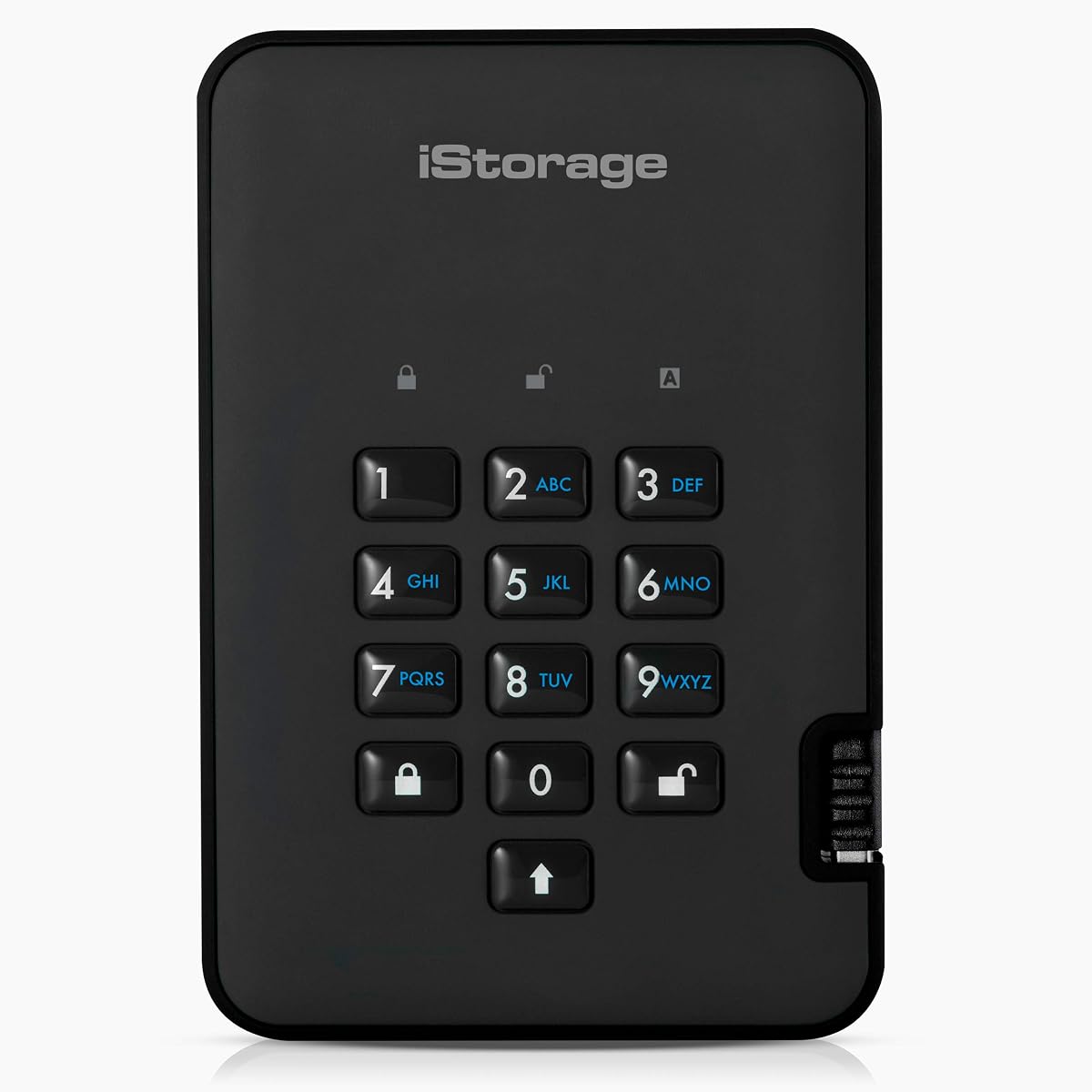

The Apricorn 1TB Aegis Padlock stands out as a top choice for users needing robust security. It features military-grade encryption validated by FIPS standards ensuring your data remains protected against sophisticated threats without needing additional software.
We may earn a commission when you buy through this link, at no additional cost to you.
This drive offers impressive speed through its USB 3.0 connection which allows for fast data transfers. The hardware-based encryption means authentication happens directly on the device making it compatible with any operating system without driver installations.
While the price is higher than standard drives the built-in security features justify the cost for sensitive data. The keypad is wear-resistant but heavy daily use might eventually affect its longevity compared to smoother interfaces.
Ideal for professionals and businesses handling confidential information this drive provides peace of mind. Its compact rugged design makes it perfect for travel while maintaining high security standards for your most important files.
FIPS PUB 197 validated encryption ensures compliance with strict government and enterprise security requirements.
USB 3.0 connection delivers speeds up to ten times faster than USB 2.0 for efficient workflow.
We may earn a commission when you buy through this link, at no additional cost to you.
This model offers a solid balance of security and capacity with its 2TB storage. The FIPS 140-2 Level 2 validation is crucial for organizations needing certified hardware encryption solutions to meet regulatory requirements.
We may earn a commission when you buy through this link, at no additional cost to you.
Manufactured in the USA this drive appeals to users prioritizing supply chain security. The integrated USB cable adds convenience reducing the risk of losing cables during travel while ensuring compatibility across various devices.
The keypad is designed for durability but entering a PIN each time can be less convenient than software solutions. However this trade-off is necessary for maintaining high security levels without relying on external software.
Best suited for government agencies and corporate environments this drive ensures data sovereignty. Its robust construction and certified encryption make it a reliable choice for storing sensitive business documents and personal data.
FIPS 140-2 Level 2 validation provides assurance of hardware security module compliance.
Integrated cable and keypad access streamline daily use without compromising protection.
We may earn a commission when you buy through this link, at no additional cost to you.
For those needing the highest level of hardware security this drive offers FIPS Level 3 validation which provides physical tamper resistance. It supports massive storage needs with 5TB capacity making it suitable for extensive data archives.
We may earn a commission when you buy through this link, at no additional cost to you.
The separation of admin and user modes adds an extra layer of control over access permissions. Read-only modes allow you to share data without risking accidental modification or deletion which is vital for compliance scenarios.
The physical size and weight reflect its rugged construction which might make it less ideal for daily carrying. However for stationary use or occasional transport the durability ensures the drive survives harsh environments.
This is an excellent choice for enterprises storing critical data that must remain secure at all times. The combination of high capacity and top-tier encryption makes it a powerful tool for long-term data protection.
FIPS Level 3 ensures the device reacts to physical attacks by erasing sensitive data.
5TB capacity supports extensive archives without needing multiple external drives.
We may earn a commission when you buy through this link, at no additional cost to you.
Western Digital offers a user-friendly solution for basic security needs with this portable drive. It includes hardware encryption and password protection making it accessible for individuals who want peace of mind without complex setup.
We may earn a commission when you buy through this link, at no additional cost to you.
The included software provides defense against ransomware which is a common threat for personal computers. Its slim design fits easily into pockets or bags ensuring you can carry your data anywhere without bulk.
While it lacks the advanced keypad of higher-end models the software interface is intuitive for most users. The trade-off is that security depends on the software being active which could be a limitation in offline scenarios.
Best for everyday backup and general storage this drive balances cost and security effectively. It is an ideal starting point for users transitioning from unencrypted drives to secure external storage.
Included backup software helps protect your files from malicious encryption attempts.
Slim durable design ensures the drive fits in any bag for travel.
We may earn a commission when you buy through this link, at no additional cost to you.
This 5TB variant provides ample space for media libraries and large file backups. It maintains the same security features as the smaller version including password protection and hardware encryption to keep your vast data safe.
We may earn a commission when you buy through this link, at no additional cost to you.
The device management software helps organize your backups and adds defense against potential ransomware attacks. While this requires installing software on your computer it simplifies the process for non-technical users.
At this capacity the drive is slightly heavier than smaller options but still remains portable. The price point remains competitive making high-capacity storage accessible without compromising on basic security features.
Perfect for users with large data needs this drive ensures your files are protected efficiently. It serves as a reliable long-term storage solution for families and professionals needing room to grow.
5TB capacity accommodates thousands of photos videos and documents in one place.
Included tools simplify scheduling and managing your data protection routines.
We may earn a commission when you buy through this link, at no additional cost to you.
This drive offers advanced customization for security settings through its Aegis Configurator software. Users can program brute-force defense parameters to detect and prevent unauthorized access attempts effectively.
We may earn a commission when you buy through this link, at no additional cost to you.
The inclusion of data recovery PINs ensures that legitimate owners can regain access if they forget their main PIN. This feature adds a layer of safety that is often missing in standard encrypted drives.
While the setup process requires some technical knowledge the control it offers is beneficial for advanced users. The separate admin and user modes allow for structured access control within shared environments.
Ideal for tech-savvy individuals or small businesses this drive provides tailored security. It balances robust protection with practical recovery options to prevent total data loss due to lockouts.
Aegis Configurator allows you to tailor security settings to your specific threat model.
Recovery PINs ensure you can access data even if primary credentials are forgotten.
We may earn a commission when you buy through this link, at no additional cost to you.
Designed for stationary use this desktop drive offers high security with a solid aluminum enclosure. It is ideal for protecting data on a fixed workstation where portability is less important than physical durability.
We may earn a commission when you buy through this link, at no additional cost to you.
The FIPS 140-2 Level 2 validation ensures it meets strict security standards for enterprise environments. TAA compliance makes it a suitable choice for government contracts and federal procurement projects.
While it requires a power outlet the drive provides consistent performance without battery concerns. The keypad allows secure access without relying on the host computer which enhances overall system security.
This drive is perfect for servers or workstations handling sensitive data daily. Its robust build and compliance features make it a reliable asset for secure office setups and controlled environments.
Solid aluminum enclosure protects internal components from physical stress and heat.
TAA compliance ensures the drive meets standards for federal government purchasing.
We may earn a commission when you buy through this link, at no additional cost to you.
This drive is designed for harsh environments with an IP56 rating for dust and water resistance. It allows you to work confidently in outdoor or industrial settings where standard drives might fail.
We may earn a commission when you buy through this link, at no additional cost to you.
The Common Criteria EAL 5+ certification provides a strong assurance of hardware security through secure microprocessor technology. This makes it a trusted choice for government and military applications requiring verified security.
Data transfers are fast due to USB 3.2 compatibility which enhances productivity despite the rugged design. The keypad is integrated into the enclosure ensuring it remains sealed against environmental contaminants.
Best for fieldwork or rugged use this drive balances security with durability effectively. It ensures your data stays safe from both digital threats and physical environmental hazards during transport.
IP56 certification protects the drive from dust ingress and water splashes.
Embedded secure processor handles encryption internally reducing software vulnerability.
We may earn a commission when you buy through this link, at no additional cost to you.
This premium SSD features an interactive touchscreen for easy setup and password management. It offers FIPS 140-3 validation the latest standard ensuring top-tier security for highly sensitive government and corporate data.
We may earn a commission when you buy through this link, at no additional cost to you.
As an SSD it delivers much faster read and write speeds compared to traditional hard drives. The USB-C connection ensures compatibility with modern laptops and devices for high-speed data transfers.
The price is significantly higher than other options but reflects the advanced security and speed capabilities. Remote management features allow administrators to audit devices which is vital for large scale deployments.
Best for high-security government and enterprise use this drive represents the cutting edge of protection. It combines modern speed with the most rigorous security standards available on the market today.
FIPS 140-3 validation meets the newest federal requirements for cryptographic modules.
Solid state storage ensures fast data access and transfer rates for productivity.
We may earn a commission when you buy through this link, at no additional cost to you.
This drive combines the speed of an SSD with robust hardware encryption for professional use. It offers 4TB capacity which is rare for secure portable drives making it ideal for large data sets.
We may earn a commission when you buy through this link, at no additional cost to you.
The read and write speeds reach up to 350MBPS ensuring efficient handling of large files. The separate admin and user modes allow for shared secure storage without compromising individual privacy.
Data recovery PINs provide a safety net for lost access codes which is critical for valuable data. The build quality ensures durability despite the high performance and storage capacity it offers.
Best for creative professionals and enterprises needing fast secure storage this drive is a top pick. It balances speed capacity and security to meet demanding workflow requirements without compromise.
SSD technology provides significantly faster speeds than traditional hard drive platters.
Distinct admin and user modes allow shared access with controlled permissions.
We may earn a commission when you buy through this link, at no additional cost to you.
Selecting the right secure drive involves understanding encryption standards build quality and your specific storage needs to ensure data safety.
Look for drives with FIPS validation such as 140-2 or 140-3 which certify the hardware meets strict cryptographic requirements. Hardware encryption is preferred over software encryption as it is faster and does not rely on the host computer for security.
Choose a drive with at least 256-bit AES encryption to ensure military-grade protection against brute force attacks and unauthorized access.
Determine how much data you need to store. Drives range from 1TB to 5TB depending on your needs. Larger capacities often come with a higher price but provide better value per gigabyte.
Select a capacity that accommodates your current files and allows room for future growth without needing frequent upgrades.
USB 3.0 and higher interfaces ensure fast data transfer which is essential for large files. SSDs offer faster speeds than traditional hard drives but come at a premium price.
Check the connection type to ensure compatibility with your devices. USB-C is becoming standard but many devices still use USB-A requiring adapters.
Physical keypads offer secure access without software dependency while software solutions might be easier to use. Biometric options are rare but offer convenience.
Ensure the authentication method is intuitive to avoid lockouts or accidental data loss due to forgotten credentials.
Rugged drives with rubber casings or IP ratings protect against drops dust and water. This is vital if you travel frequently or work in harsh environments.
Check the warranty and build materials like aluminum enclosures for physical protection against impact and heat.
If you are in government or corporate sectors check for TAA compliance and specific FIPS levels. These are often mandatory for contracts and procurement.
Ensure the drive meets industry regulations like HIPAA or GDPR to avoid legal issues regarding data handling and security.
Verify that the drive works with Windows macOS and Linux without requiring extra drivers. Hardware encrypted drives usually support all major systems out of the box.
Cross-platform compatibility ensures you can access your data across different devices and operating systems seamlessly.
Look for drives that offer data recovery PINs or admin override capabilities. These features prevent total data loss if you forget your password.
Test recovery options early to ensure you can regain access when needed without vendor support delays.
Connect the drive to a USB port and wait for the authorization prompt. Enter your PIN on the keypad to unlock the drive and access your files without installing additional software on your computer.
Avoid removing the drive while data is being written to prevent corruption. Always eject the drive safely through your operating system to ensure all changes are saved before unplugging it.
Store the drive in a cool dry place to protect the internal components from heat and humidity. Regularly update your PIN and test recovery options to ensure the drive remains functional and secure over time.
Hardware encryption uses a dedicated processor on the drive to encode data which is faster and more secure than software encryption. Software encryption relies on your computer's resources and can be vulnerable to malware or system attacks.
Yes hardware encrypted drives work on any operating system like Windows macOS or Linux without drivers. You just need to enter the correct PIN on the device's keypad to unlock it for reading and writing.
Most secure drives offer data recovery PINs or admin override features that allow you to regain access. Without these features forgetting a PIN can lead to permanent data loss so it is vital to keep recovery codes safe.
FIPS 140-2 is widely accepted but FIPS 140-3 is the newer standard. For most federal contracts 140-2 is sufficient but high-security agencies may require 140-3 validation for compliance.
Yes since the encryption is hardware-based the drives are OS independent. You can connect them to a Mac or a PC and unlock them using the same PIN regardless of the system's file format.
Most drives come with a USB cable but you may need adapters for USB-C ports. Check the package contents and your device ports to ensure you have the right connections for transfer.
It is recommended to update your PIN every six months to reduce risk of compromise. Regular password changes help maintain security especially if the drive is shared or accessed by multiple users.
Modern hardware encryption does not significantly slow down transfer speeds because it happens in real time. Drives with USB 3.0 or SSDs maintain high performance even with full encryption enabled.
We reviewed ten top options ranging from budget-friendly models to high-security SSDs. Each drive offers distinct features like FIPS validation rugged builds or large capacity to suit different professional needs.
Prioritize encryption standards and recovery features when making your choice. Ensure the drive meets your compliance requirements and offers a comfortable authentication method for daily use.
Remember to check current availability and prices before purchasing. Security needs vary so select the model that best fits your specific data protection goals and workflow requirements.