
4K Vlogging Camera Pocket Digital Camera
4.4Editor score
330-degree rotating lens
Built-in WiFi transfer
Includes accessory kit
Discover the top cameras for social media content creators in October 2026. This guide compares features, quality, and ease of use for vlogging and streaming.
Creating compelling content for social media requires the right tools to capture high-quality visuals and audio that engage audiences effectively across various platforms and demographics today.
We have evaluated the latest cameras available in November 2026, focusing on portability, resolution, stabilization, and connectivity features that matter most for modern content creators and vloggers.
Each pick below highlights specific strengths for different needs, from budget-friendly options to premium devices, but remember that model availability and pricing can change frequently over time.
4.4Editor score

4.5Editor score

4.3Editor score
The following comparison table provides a side-by-side overview of key specifications for each camera, helping you quickly identify which device aligns with your specific content creation goals and technical requirements.




The DJI Osmo Pocket 3 Creator Combo stands out as a top-tier choice for content creators seeking professional quality in a compact form factor. With its 1-inch CMOS sensor, it captures stunning 4K footage at 120fps, making it ideal for high-motion content like travel vlogs or action shots.
We may earn a commission when you buy through this link, at no additional cost to you.
Its advanced 3-axis mechanical stabilization ensures that footage remains smooth even when moving quickly, while the rotating 2-inch touch screen allows for effortless framing in both horizontal and vertical orientations. The ActiveTrack 6.0 feature keeps you centered in the frame, which is invaluable for solo creators.
While the cost is higher than budget alternatives, the inclusion of D-Log M and 10-bit color depth offers significant flexibility for post-production color grading. The stereo audio recording also reduces the need for external microphones in many scenarios.
This camera is best suited for serious creators who need reliable, high-quality output without carrying heavy gear. Its portability and ease of use make it a powerful tool for anyone looking to elevate their social media presence quickly.
Larger sensors capture more light, resulting in better performance in low-light conditions like sunsets or indoor settings, which are common in social media video creation.
The screen rotation simplifies switching between landscape and portrait modes, which is critical for platforms like TikTok and Instagram Reels that prioritize vertical video.
We may earn a commission when you buy through this link, at no additional cost to you.
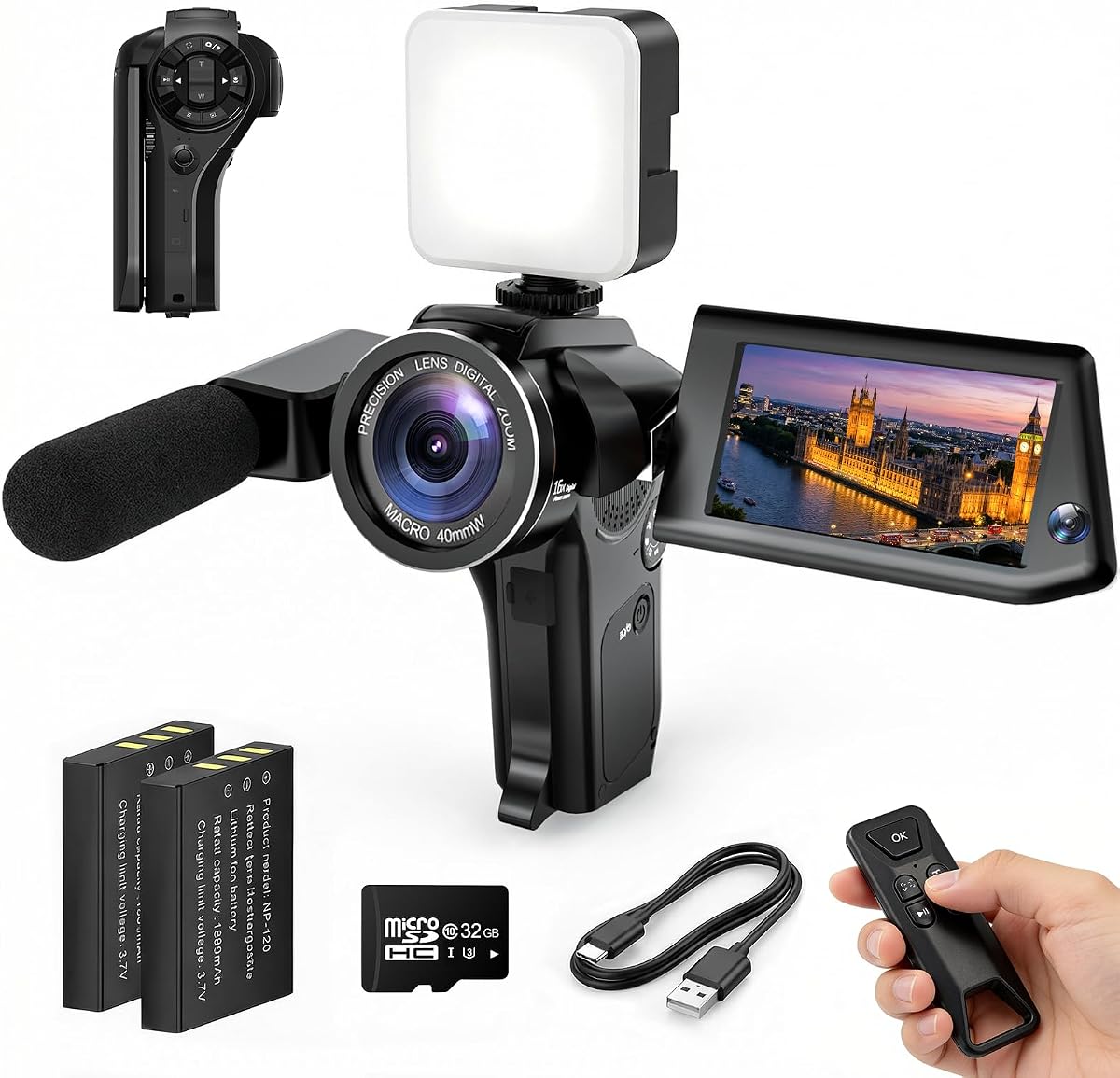
This 4K Vlogging Camera is designed specifically for beginners and first-time content creators who need an easy entry point into video production. The unique 330-degree rotating lens allows you to frame yourself or your surroundings without adjusting the camera body repeatedly.
We may earn a commission when you buy through this link, at no additional cost to you.
It records 4K video and captures 75MP photos, providing sufficient quality for most social media platforms. The built-in WiFi feature simplifies the workflow by allowing you to transfer files directly to your smartphone for quick editing and posting.
The package comes with essential accessories like a TF card, tripod, and carrying bag, which means you can start recording immediately without additional purchases. The compact design makes it perfect for travel and daily life recording.
While it may not match the image fidelity of premium models, it offers excellent value for its price. It is an ideal choice for students, hobbyists, or anyone starting their vlogging journey who wants a portable and functional camera.
The simplified interface and automatic settings reduce the learning curve, allowing new creators to focus on content creation rather than technical camera adjustments.
The ability to rotate the lens 330 degrees provides natural framing for solo vlogs and reduces the need for constant camera repositioning during shoots.
We may earn a commission when you buy through this link, at no additional cost to you.
The FlyFrost 8K Video Camera pushes the boundaries of resolution with its 8K video recording and 88MP photo capture capabilities. This level of detail is beneficial for creators who plan to crop or zoom into footage during post-production without losing clarity.
We may earn a commission when you buy through this link, at no additional cost to you.
It features IR Night Vision, allowing you to capture clear black and white footage in dark environments, which adds a unique visual element to storytelling. The 3.0-inch touch screen supports 270-degree rotation and 18X digital zoom for versatile shooting angles.
Additionally, the webcam function enables high-quality live streaming when connected to a computer, making it a dual-purpose tool for vlogging and online communication. The inclusion of accessories like a lens hood and stabilizer enhances its professional utility.
While it is heavier and the interface may be complex for some users, the feature set is unmatched in this category. It is suitable for creators who prioritize resolution and advanced recording modes over portability and simplicity.
8K resolution provides significantly more pixels than 4K, allowing for high-quality downscaling and flexible cropping while maintaining sharpness in social media clips.
The IR capability allows for creative night shooting without external lighting, expanding the possibilities for indoor or low-light content creation.
We may earn a commission when you buy through this link, at no additional cost to you.
This camera combines photography and video capabilities with its 96MP photo resolution and 8K video recording. The 3.5-inch 180-degree flip screen is essential for selfie-style vlogging and ensures accurate framing during recording.
We may earn a commission when you buy through this link, at no additional cost to you.
It supports HDR imaging to improve dynamic range and realism in photos and videos. The 20X digital zoom allows you to capture distant details without moving closer, which is useful for outdoor shoots or wildlife content.
The inclusion of two high-capacity batteries ensures you can record for longer periods without interruption, which is a significant advantage for all-day shooting. The transfer app allows seamless sharing to social media platforms.
While the anti-shake feature is basic, the ergonomic design makes it comfortable to hold. It is a solid option for creators who need a versatile tool for both photos and videos without breaking the bank.
The flip screen simplifies framing for self-recorded content, ensuring you are always in the shot without guessing angles or relying on external monitors.
Having two batteries included reduces downtime during shoots, allowing you to swap them quickly and maintain productivity during long recording sessions.
We may earn a commission when you buy through this link, at no additional cost to you.
This mini camcorder focuses on simplicity and portability, making it easy to carry for spontaneous recording moments. Its compact size fits in a pocket, which is ideal for travel and daily use where carrying heavy gear is impractical.
We may earn a commission when you buy through this link, at no additional cost to you.
The 7-hour battery life supports long recording sessions, allowing you to capture events or vlogs without frequent charging. The one-button recording feature means you can start filming instantly without navigating complex menus.
The 180-degree rotating lens helps with self-recording and point-of-view shots. Although it does not offer DSLR-level quality, it provides a straightforward solution for casual creators who prioritize convenience over technical specs.
It is best suited for travel bloggers or parents who want to capture memories quickly. The included 32GB memory card adds immediate usability, making it a great gift for beginners who want a no-fuss camera.
The compact design ensures you are always ready to record without the burden of a large camera bag, encouraging spontaneous content creation.
The extended battery life reduces anxiety about running out of power during important moments, ensuring you can capture entire events without interruption.
We may earn a commission when you buy through this link, at no additional cost to you.
Similar to the previous budget option, this camera offers 4K video recording and a 330-degree rotating lens for flexible framing. It is designed to be user-friendly, making it suitable for creators who want quality without complexity.
We may earn a commission when you buy through this link, at no additional cost to you.
The 75MP photo capture provides detailed stills that can be used for social media posts or thumbnails. The WiFi transfer feature allows you to move content to your phone quickly for editing and sharing on various platforms.
Its pocket-sized design makes it easy to transport on trips or daily commutes. The fast autofocus and wide-angle lens help ensure sharp and stable footage even when you are moving around.
This camera is a reliable workhorse for everyday recording. It is perfect for users who need a dependable tool for daily vlogs, travel stories, or casual family videos without investing in professional gear.
The 330-degree rotation simplifies framing for self-shots, reducing the need for tripods or mirrors during vlogging sessions.
Quick autofocus ensures subjects remain sharp during movement, which is crucial for dynamic social media content.
We may earn a commission when you buy through this link, at no additional cost to you.
This camera distinguishes itself with a Picture-in-Picture mode that records both the scene and your reaction simultaneously. This feature adds a personal layer to content, making videos more engaging for audiences on platforms like YouTube or TikTok.
We may earn a commission when you buy through this link, at no additional cost to you.
It is ideal for tutorials, reviews, and reaction videos where showing the creator alongside the product or topic enhances the storytelling experience. The WiFi flip screen facilitates easy framing and content transfer.
The 8K Creator Kit branding suggests a focus on content quality and ease of use. While hardware specifics are less emphasized, the unique recording style offers value that standard cameras cannot match.
Creators who focus on personal engagement or educational content will find this camera particularly useful. It is a great choice for those looking to add a personal touch to their videos without complex editing.
The Picture-in-Picture mode allows viewers to see both the content and the creator's reactions, which increases trust and engagement with the audience.
Showing your face while demonstrating a task helps viewers connect with you personally, making tutorials and reviews more effective and relatable.
We may earn a commission when you buy through this link, at no additional cost to you.
This kit provides essential accessories to enhance the video quality of your smartphone. It includes a wireless microphone for clear audio, an RGB fill light for better lighting, and tripods for stable shots.
We may earn a commission when you buy through this link, at no additional cost to you.
The flexible tripod allows you to wrap it around objects for creative angles, while the camera tripod offers stability for static shots. The RGB light helps adjust brightness and tone to ensure professional-looking videos.
Since it works with both iPhone and Android, it is a versatile option for anyone looking to upgrade their mobile setup. The Bluetooth remote adds convenience for hands-free recording and starting sessions remotely.
This kit is perfect for creators who want to maximize their smartphone's potential. It is an excellent entry point for TikTok or YouTube creators who want professional results without buying a dedicated camera.
Clear audio is crucial for viewer retention. The wireless microphone ensures your voice is heard clearly, which significantly improves the quality of your vlogs.
The RGB fill light helps eliminate shadows and improve skin tones, making your videos look more polished and professional.
We may earn a commission when you buy through this link, at no additional cost to you.
This kit features an intelligent face-tracking tripod that keeps you centered in the frame automatically. With gesture control, you can start or pause tracking without touching the phone, making it ideal for hands-free recording.
We may earn a commission when you buy through this link, at no additional cost to you.
The dual wireless microphones ensure high-quality audio with low latency, while the LED lights provide sufficient illumination for various environments. The 70-inch height offers versatility for both high and low-angle shots.
It supports both iPhone and Android devices and works with platforms like Zoom and TikTok. The remote control and universal mounts make it easy to integrate into existing workflows.
This kit is designed for creators who want advanced features like face tracking. It is a comprehensive solution for social media and live streaming, offering professional capabilities at an accessible price.
Automatic face tracking ensures you stay in focus while moving, which is essential for dynamic vlogs without needing a cameraman.
Gesture controls allow you to manage the camera effortlessly, keeping your focus on content rather than device settings.
We may earn a commission when you buy through this link, at no additional cost to you.
The Logitech Brio 101 is a high-quality webcam designed for streaming and meetings. Its Auto-Light Balance technology boosts brightness and reduces shadows, ensuring you look professional even in less-than-ideal lighting.
We may earn a commission when you buy through this link, at no additional cost to you.
The privacy slide adds a layer of security when not in use, and the built-in microphone simplifies setup. It supports major platforms like Zoom and Teams, making it a versatile tool for online communication.
The USB A connection ensures a reliable and easy plug-and-play experience. The adjustable settings via the Logi Options+ app give you control over zoom and framing to suit your needs.
While it is primarily a webcam, it serves well for stationary social media content like live streams or tutorials. It is a practical choice for creators who value convenience and consistent image quality.
This feature automatically adjusts the camera exposure to compensate for lighting changes, ensuring consistent video quality in dynamic environments.
The integrated cover allows you to quickly protect your privacy, which is a valuable feature for creators working from home.
We may earn a commission when you buy through this link, at no additional cost to you.
Selecting the right camera involves understanding your specific content goals and budget. This guide outlines key factors to consider to ensure your investment supports your growth as a creator.
Higher resolution like 4K or 8K ensures your content looks sharp on all devices. However, consider storage and processing requirements as higher resolution files are larger.
Aim for at least 4K for future-proofing your content, but balance this with the storage capabilities of your editing devices.
Stabilization is critical for handheld recording to avoid shaky footage. Mechanical or electronic stabilization helps produce smooth videos for walk-and-talk segments.
Prioritize cameras with built-in stabilization to reduce reliance on external gimbals or tripods for casual shooting.
A portable camera makes it easier to capture content on the go. Look for lightweight models that fit in pockets or small bags for travel.
Choose a compact model if you plan to record frequently while traveling or attending events where space is limited.
Clear audio is as important as video quality. Check if the camera supports external microphones or has decent built-in mics.
Ensure the device allows for external audio input to maintain professional sound quality in noisy environments.
WiFi and Bluetooth enable quick transfers to your phone for editing and posting. This streamlines the workflow for social media updates.
Select a camera with robust transfer options to reduce the time spent moving files between devices.
Beginner-friendly interfaces help you focus on content rather than settings. Look for models with intuitive controls and automatic modes.
Choose a camera with simple menus and helpful guides if you are new to video production.
Long battery life is essential for extended recording sessions. Consider cameras that support swappable batteries or external power options.
Opt for models with extended battery life to avoid interruptions during important shoots or events.
Set a budget that aligns with your current needs and future growth. Entry-level cameras offer good value, while premium options provide advanced features.
Invest in a model that balances cost with the features you actually need for your specific content style.
Always charge your camera fully before starting a shoot to ensure you do not run out of power. If available, carry spare batteries or a portable power bank for extended sessions.
Clean the lens regularly with a soft cloth to remove dust and fingerprints. Keep the camera body and accessories stored in a dry and safe place to prevent damage.
Familiarize yourself with the camera settings before going live. Practice framing and lighting setups to ensure you are confident when recording your content.
1080p is standard for many platforms, but 4K offers better quality for editing and downscaling. It provides more flexibility for zooming and cropping without losing clarity in social media posts.
Smartphones are powerful and convenient for casual content. However, a dedicated camera offers better low-light performance and manual controls that can significantly enhance professional videos.
Stabilization prevents shaky footage, which can distract viewers. It ensures smooth video even when you are moving, making your content look more polished and professional.
Yes, webcams are effective for streaming or studio-based content. They offer fixed setups that are convenient for tutorials or live interaction where mobility is not a priority.
Cameras with WiFi allow wireless transfer directly to mobile apps. This eliminates the need for cables and speeds up your workflow for instant editing and posting.
8K is overkill for most current platforms. While it offers future-proofing, 4K is sufficient for today and requires less storage and processing power.
Choosing the right camera depends on your specific needs, whether you prioritize portability, resolution, or ease of use. Our top picks cover a range of budgets and capabilities to fit various creator profiles.
Focus on what matters most to your audience, such as video quality and audio clarity. A reliable camera is an investment in the quality and consistency of your content creation.
Remember that model availability and pricing can change, so always check the latest specifications before making a purchase decision. This ensures you get the best value for your needs.