
RedThunder One Handed Gaming Keyboard RGB Backlit 35 Keys Portable Mini Gaming Keypad Ergonomic Game Controller for PC Gamer
4.4Editor score
35 keys anti ghosting
RGB backlight modes
Plug and play ready
This guide compares the top left handed gaming keyboards for 2026 featuring ergonomic designs mechanical switches and one handed layouts for optimized comfort
Finding the right left handed gaming keyboard can transform your entire setup by improving comfort and efficiency. These specialized devices cater to users who prefer typing with their dominant left hand while keeping the mouse on the right side for better control during intense gaming sessions.
We evaluated ten distinct products ranging from full sized ergonomic layouts to compact one handed mechanical padds. Our analysis focused on build quality switch types customization options and how well each device supports both gaming and productivity tasks for left handed users.
Each pick highlights specific strengths such as rapid trigger technology customizable macros or enhanced ergonomic support. Please note that prices and availability change frequently so verify current listings before making your final purchase decision to ensure you get the best value available today.
4.4Editor score

4.6Editor score

4.3Editor score
This comparison table provides a quick overview of the top features and specifications for each product to help you decide which one fits your specific needs and budget.



The RK ROYAL KLUDGE L98 stands out as a top choice for left handed gamers seeking a full mechanical experience without sacrificing ergonomics. Rated highly by users, this keyboard reimagines the standard layout by moving the numpad to the left side which frees up valuable desk space for mouse movement while gaming.
We may earn a commission when you buy through this link, at no additional cost to you.
Its gasket mounted structure combined with five sound dampening layers delivers a premium typing feel that is both soft and satisfying. The inclusion of durable PBT keycaps ensures resistance against shine and oil buildup over time. You can connect via 2.4GHz wireless, Bluetooth, or USB-C making it versatile for multiple devices and setups.
While the price point is higher than entry level options the build quality and feature set justify the investment for serious users. The hot swappable PCB allows you to change switches easily if you prefer a different tactile feel later on. Battery life is exceptional ensuring weeks of use without needing a recharge.
This keyboard is ideal for gamers who want a reliable full size layout adapted for left handed use. The ergonomic benefits combined with robust wireless connectivity make it a strong recommendation for anyone looking to upgrade their gaming station efficiently.
Moving the numpad to the left side allows the right hand to stay free for mouse usage reducing strain during long sessions.
Five internal layers including foams and silicone reduce hollow sounds for a quieter and more enjoyable typing experience.
We may earn a commission when you buy through this link, at no additional cost to you.
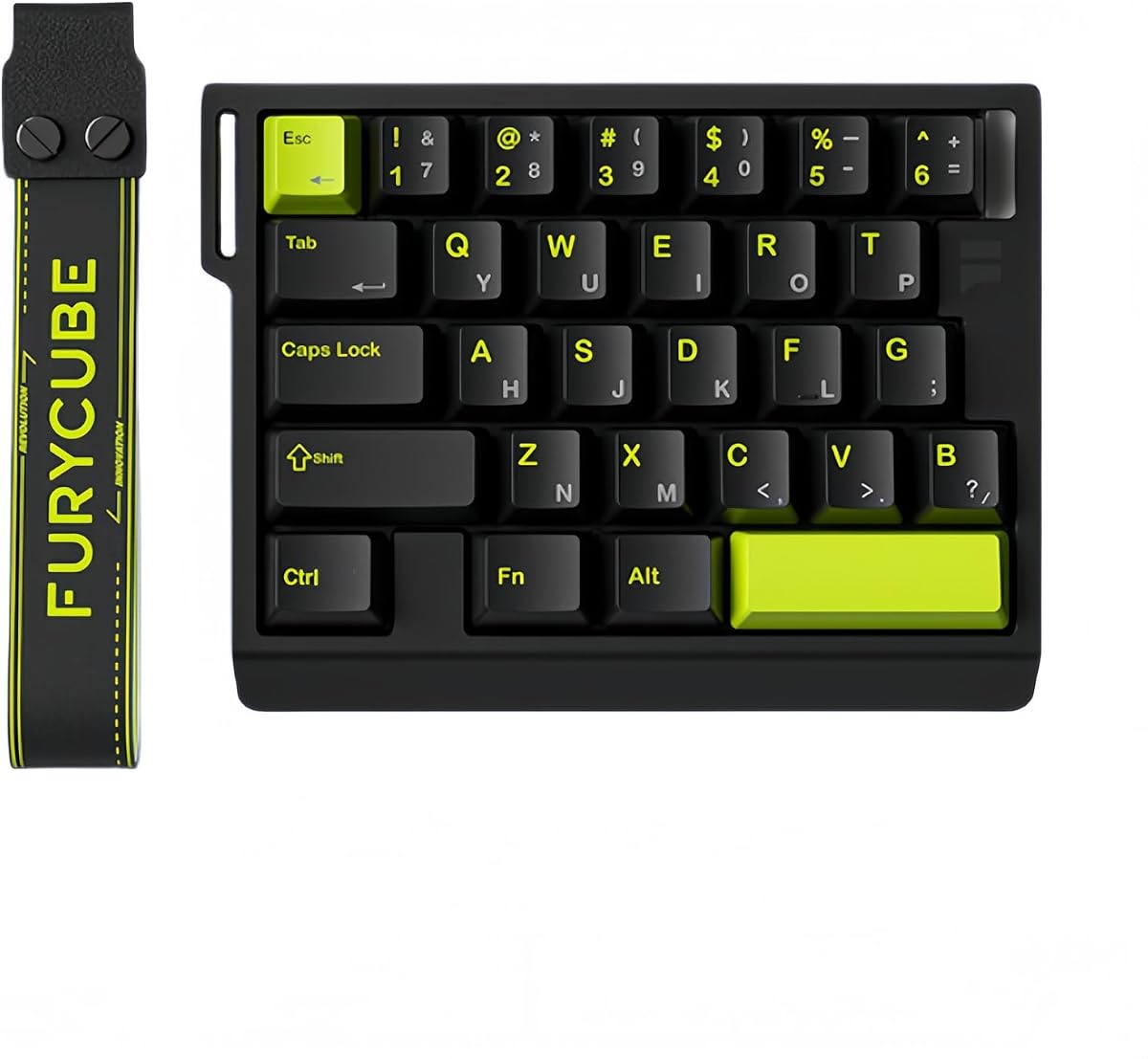
The RedThunder One Handed Gaming Keyboard offers an accessible entry point for gamers looking to try a one handed layout without spending much. With a 4.4 rating users appreciate its plug and play simplicity and responsive performance for casual gaming sessions.
We may earn a commission when you buy through this link, at no additional cost to you.
It features 35 keys with anti ghosting support ensuring that multiple key presses are registered accurately during fast paced action. The macro recording function allows you to automate complex commands which is especially useful for MMOs or strategy games. RGB lighting adds a customizable aesthetic touch to your setup.
The main trade-off is the limited number of keys and basic plastic construction which may not feel as robust as premium options. However for the price this is hard to beat for those who need a functional keypad for specific titles or work shortcuts.
This product is perfect for students or budget conscious gamers who want a dedicated input device for specific tasks. Its ease of use and low cost make it a practical choice for experimenting with one handed gaming setups.
Two sets of macro keys allow you to record and playback sequences for efficient gameplay or work automation.
The small form factor saves desk space and makes it easy to carry in a laptop bag for gaming on the go.
We may earn a commission when you buy through this link, at no additional cost to you.
The AZERON Gaming Keypad represents the pinnacle of one handed input devices with its innovative integration of a Hall Effect analog thumbstick. Rated 4.3 this device is designed for serious gamers who demand precision control over movement alongside rapid key presses.
We may earn a commission when you buy through this link, at no additional cost to you.
Its Hall Effect thumbstick eliminates drift and supports 360 analog movement which is ideal for FPS or racing games. You can store up to six layouts directly on the device allowing quick switching between different game profiles. The 3D printed construction ensures a custom ergonomic fit that accommodates various hand sizes comfortably.
Despite its premium features the high cost may deter casual users. Additionally mastering the advanced software to unlock full potential requires time and patience. However for those willing to invest the performance gains and comfort are unmatched in the category.
This keypad is best suited for competitive gamers and enthusiasts who want a high performance tool tailored to their needs. The combination of mechanical keys and analog control offers a unique advantage that traditional keyboards cannot provide.
Magnetic sensing in the thumbstick ensures smooth and drift free movement without physical contact wearing out over time.
The modular design allows you to update components or software easily ensuring longevity and adaptability for future needs.
We may earn a commission when you buy through this link, at no additional cost to you.
The AZERON Keyzen brings high end mechanical switch quality to the one handed market with its integration of Cherry MX Red switches. Rated 4.6 this keypad offers a familiar tactile feel for users upgrading from full keyboards while adding the convenience of analog joystick control.
We may earn a commission when you buy through this link, at no additional cost to you.
Its 360 Hall effect joystick allows for precise movement without the stick drift common in potentiometer based devices. You can configure each of the 32 keys individually as keyboard mouse or controller inputs. The included palm rests and adjustable angles ensure that your hand stays comfortable even during long gaming marathons.
The modular nature means you can replace worn parts rather than buying a new device which adds long term value. However the complexity of the software required to maximize customization might be a hurdle for less tech savvy users. The cost reflects the premium materials and engineering involved.
This device is an excellent choice for users who want the reliability of mechanical switches combined with advanced analog control. It is particularly beneficial for MMO and simulation gamers who need both speed and precision in their input device.
Using Cherry MX switches ensures consistent actuation and durability over millions of keystrokes compared to generic alternatives.
Swappable keycaps and adjustable wrist rests let you tailor the fit to your exact hand size and preference.
We may earn a commission when you buy through this link, at no additional cost to you.
The AJAZZ AK029 is engineered specifically for competitive FPS players who need rapid response and precise movement control. With a 4.5 rating it stands out for its magnetic switches that support rapid trigger technology allowing keys to reset instantly without needing to reach the bottom.
We may earn a commission when you buy through this link, at no additional cost to you.
An 8KHz polling rate ensures that every command is registered with near zero latency providing a competitive edge in fast games. The layout is mini with 29 keys designed to free up desk space for wide mouse movements. An integrated wrist rest adds ergonomic comfort for extended play sessions.
The build quality is solid with an aluminum alloy plate that enhances stability. However the absence of wireless connectivity might be a drawback for some users who prefer clean desk setups. The limited keys require you to map functions carefully to cover all needs.
This keyboard is ideal for esports enthusiasts who prioritize speed and accuracy above all else. Its advanced features like SOCD and DKS make it a powerful tool for executing complex movement techniques efficiently.
Keys reset as soon as you lift them allowing for faster direction changes and double taps than standard switches.
An 8KHz polling rate reduces input delay ensuring your actions reflect on screen almost instantly during gameplay.
We may earn a commission when you buy through this link, at no additional cost to you.
The Ergonomic Left Handed Keyboard focuses on business and accounting users who spend hours typing and require relief from repetitive strain. With a 4.4 rating this device uses a patented Natural_A keycap shape to reduce back and shoulder strain during daily work.
We may earn a commission when you buy through this link, at no additional cost to you.
It includes eight multimedia hotkeys for quick access to volume and other functions without leaving your workflow. The design allows the left hand to operate the numeric keypad while the right hand remains on the mouse which improves overall posture. Compatibility with both PS/2 and USB ensures it works with older business hardware.
While it excels in professional environments it lacks the features needed for gaming such as macro support or high speed response. The design prioritizes comfort and utility for data entry which makes it less versatile for entertainment tasks. However for accounting work it provides tangible ergonomic benefits.
This keyboard is best suited for office workers who need a reliable input device that supports long term health. Its focus on posture improvement and ease of use makes it a strong contender for business users with left handed needs.
The ergonomic key layout encourages a natural hand position that reduces stress on the wrist and shoulder muscles.
Optimized for data entry and spreadsheet tasks ensuring efficiency in professional accounting environments.
We may earn a commission when you buy through this link, at no additional cost to you.
The Keychron C0 HE is a competitive geared one handed keypad designed for FPS players who need low latency control. It features rapid trigger hall effect switches that provide precise movement and instant resets for better accuracy in fast titles.
We may earn a commission when you buy through this link, at no additional cost to you.
A key feature is its web based configurator which lets you customize keys and lighting without installing heavy software on your system. This cross platform support works on both Windows and macOS making it versatile for different user setups. The 35 key layout ensures essential commands are within easy reach.
The lack of wireless connectivity limits its flexibility compared to other modern models. While the magnetic switches are high quality the overall rating suggests some users found minor issues with build or software consistency. Still the configurator adds significant convenience for setup.
This device is a great option for creators and gamers who want a flexible tool without complex installations. Its speed and configurability make it suitable for streamers and power users looking to automate shortcuts efficiently.
Works on both macOS and Windows without drivers making it easy to use on different computers.
Customize keys and lighting online in your browser saving your local system from extra software installations.
We may earn a commission when you buy through this link, at no additional cost to you.
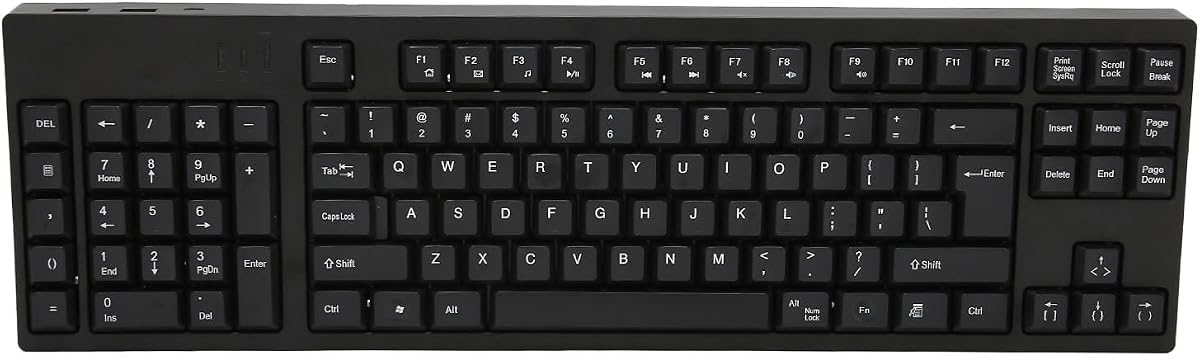
This Left Handed Keyboard offers a full 109 key layout which is rare for left handed devices providing a complete typing experience without compromises. With a perfect 5.0 rating users appreciate the ergonomic design that shifts the numpad to the left for better balance.
We may earn a commission when you buy through this link, at no additional cost to you.
It connects via Micro USB but includes two additional USB interfaces allowing you to connect peripherals like a mouse directly to the keyboard. This pass through feature is highly convenient for reducing cable clutter on your desk. The plug and play functionality ensures it works instantly on any computer.
The design focuses on general productivity and accounting rather than gaming features like macros or mechanical switches. While the Micro USB port is dated for modern USB-C devices it does the job for most standard setups. The high rating indicates strong user satisfaction with comfort.
This keyboard is perfect for users who need a full size layout tailored for left handed use. Its USB hub functionality and ergonomic build make it a solid choice for office work and daily tasks.
Two extra USB ports let you plug in devices directly to the keyboard saving space on your computer ports.
Retaining 109 keys means no loss of functionality compared to standard full sized keyboards.
We may earn a commission when you buy through this link, at no additional cost to you.
The FKZ M30HE targets esports gamers who require adjustable actuation points for precise control. It features magnetic switches that allow you to set actuation from 0.1mm to 3.4mm enabling a tailored feel for different games.
We may earn a commission when you buy through this link, at no additional cost to you.
With an 8KHz polling rate the keyboard responds quickly to inputs minimizing lag during competitive matches. The web driver makes it easy to remap keys and set macros without installing local software. Its compact 30 key layout keeps essential controls accessible while saving desk space.
The north facing LEDs improve visibility of RGB lighting for backlight effects. However the rating is lower than rivals suggesting potential issues with build consistency or software ease. The hot swap feature adds value by allowing future customization if needed.
This device is ideal for gamers who want specific control over actuation and lighting. Its advanced features make it a strong contender for players looking to optimize their setup for competitive play.
Set each key's trigger point precisely to suit your touch style or game requirements.
Configure macros and lighting online without needing complex software installations on your hard drive.
We may earn a commission when you buy through this link, at no additional cost to you.
The A4tech Ergonomic Left Handed Keyboard focuses on business users who need comfort and efficiency for long data entry sessions. It features a patented design to reduce back and shoulder strain ensuring a healthier posture during daily work.
We may earn a commission when you buy through this link, at no additional cost to you.
Eight multimedia hotkeys allow quick control of system functions without disrupting your workflow. The keyboard is wired via USB offering reliable connectivity without battery concerns. While it lacks gaming features its ergonomic design targets the specific needs of office professionals.
The simple plug and play setup makes it accessible for non tech savvy users. However standard keycaps may feel less premium compared to mechanical options. Its focus on health and practicality makes it a solid choice for accounting roles.
This product is best suited for professionals prioritizing health and productivity over entertainment features. Its ergonomic benefits and ease of use make it a practical tool for office environments.
The layout is engineered to minimize physical strain during repetitive typing tasks to protect your wrists.
Integrated hotkeys streamline common tasks increasing efficiency for daily business operations.
We may earn a commission when you buy through this link, at no additional cost to you.
Selecting the right left handed gaming keyboard requires considering several key factors to ensure it meets your gaming and comfort needs effectively.
The primary advantage of a left handed keyboard is its ergonomic design which places essential keys like the numpad or WASD cluster under the left hand. This allows the right hand to remain on the mouse for precise aiming reducing strain and fatigue during long sessions. Look for models with adjustable wrist rests or angled designs to maintain a natural hand position.
Prioritize keyboards that reduce physical strain to prevent repetitive stress injuries over time.
Different switch types affect feel and speed significantly. Mechanical switches offer tactile feedback and durability while magnetic hall effect switches allow for adjustable actuation and rapid triggers crucial for competitive games. Consider whether you prefer linear smooth keys or tactile bumpy feedback based on your preference.
Choose switches that match your desired speed and comfort levels for optimal gameplay.
One handed devices vary from compact 29 or 30 key pads to full 109 key layouts. A compact keypad saves space for mouse movement but may lack common keys for shortcuts. A full layout preserves all standard keys but occupies more desk area. Decide based on whether you prioritize space or key accessibility.
Balance key availability with available desk space to avoid clutter.
Wired models ensure zero latency which is critical for esports while wireless options reduce cable clutter. If you choose wireless check battery life to ensure it lasts through long gaming sessions. Some keyboards offer multiple modes like Bluetooth and 2.4GHz wireless for connecting to different devices.
Select connectivity that aligns with your need for speed versus setup flexibility.
Programmable keys allow you to record macros or bind actions that simplify complex in game maneuvers. Software support for remapping and lighting customization adds versatility for different game genres. Check if the device has onboard memory to store settings without running background software.
Ensure robust macro support to tailor commands to your specific game style.
Durable materials like aluminum or high quality ABS plastic ensure longevity under heavy use. A solid frame prevents flexing during rapid key presses which helps maintain stability. Look for features like gasket mounting or rubber feet that reduce noise and vibration.
Opt for sturdy materials to guarantee a stable and reliable typing experience.
Prices range from budget friendly options around twenty dollars to premium models costing hundreds. Evaluate whether features like analog sticks or advanced software justify the cost for your usage. Consider long term value by choosing a device with replaceable parts or hot swappable switches.
Align your budget with the features that matter most to your gaming style.
Check that the keyboard works with your operating system whether Windows or macOS. Some devices require specific drivers for full functionality which should be verified before purchase. Also ensure the port type matches your computer's available inputs such as USB-C or USB-A.
Confirm software and hardware compatibility to avoid connectivity issues.
Start by connecting the keyboard securely to your PC and ensure all drivers or configuration software are installed properly. Arrange the device so your left hand sits comfortably on the keys without stretching your shoulder or wrist too far.
Regularly clean the keys with a soft brush or compressed air to remove dust and debris that may affect performance. Use a dry cloth to wipe down the surface avoiding harsh chemicals that could damage the finish or rubber components.
Adjust lighting and macro settings according to your personal preference or game requirements to maximize efficiency. Keep the device in a cool and dry place when not in use to extend its lifespan and maintain performance.
While designed specifically for left handed users many of these devices are ergonomic enough for right handed users to use comfortably. However the layout may feel awkward initially as key placement differs from standard full size boards. Testing a few models is recommended to ensure you find a comfortable fit.
Hall Effect switches use magnetic sensors to detect key presses providing adjustable actuation and rapid trigger functionality. This allows for precise movement control and instant resets which are vital for competitive gaming. They also tend to be more durable than traditional mechanical switches due to less physical wear.
Yes many one handed keyboards can be used for work especially if they support macro recording and standard keyboard inputs. Productivity tasks benefit from programmable keys that simplify repetitive actions. However ensure the layout fits your specific job requirements before purchasing.
Some models work plug and play but full customization like macros and RGB lighting usually requires software. Many modern keyboards offer web based configurators to reduce installation needs. Always check software availability and compatibility with your system before buying.
Wired connections generally provide lower latency which is critical for competitive gaming. Wireless options offer convenience and cleaner setups but may introduce slight input lag. Choose based on whether speed or desk aesthetics is more important for your setup.
With proper care high quality keyboards can last for several years even with frequent use. Magnetic switches tend to have longer lifespans than mechanical ones. Regular cleaning and avoiding physical damage can significantly extend the device's operational life.
Yes ergonomic layouts reduce wrist strain and improve posture by aligning keys naturally with your hands. This helps prevent repetitive stress injuries like carpal tunnel during long typing sessions. Look for devices with wrist rests to maximize comfort while working.
Many modern keyboards feature hot swappable PCBs allowing you to change switches without soldering. This offers flexibility to adjust the typing feel as your needs change. Always verify compatibility if you plan to replace switches manually.
The top picks for November 2026 include the RK ROYAL KLUDGE L98 for its all round versatility the RedThunder One Handed for budget friendly value and the AZERON Gaming Keypad for premium performance.
When selecting a model prioritize ergonomic design and switch type to ensure the device supports your specific gaming and productivity needs without causing discomfort over time.
Remember that prices and availability can change quickly so checking current listings is essential to secure the best deal on your chosen product today.